

Endpoint Privilege Management
An award-winning, comprehensive, and secure SaaS-based solution to standing admin rights that’s lightweight, easy to deploy, and simple to use






































Complexity is Your Biggest Vulnerability

You Don’t Have to Choose
End the struggle between giving users admin rights or drowning your helpdesk in install requests. Just deploy our endpoint software and free up your IT resources.
Our client automatically intercepts installations, scans with 37+ antivirus engines, and executes with full admin privileges while keeping users as standard accounts. Approve every request or use AI and machine learning to speed up the process, with granular security and privacy settings for your unique risk tolerance.
Our OFFLINE agent installers are less than 3MB, and average use requires under 1% endpoint CPU utilization.
Your Users Already Know How To Use Our Software
The strongest security solution is the one that actually gets used.
With Endpoint Privilege Management’s invisible simplicity, users continue their normal workflow without learning new processes or waiting for approval. When they need to install new software or change settings, it just works.
The Next Generation of Access Management
Run As Admin for a Smaller Attack Surface
Elevate only the application, not the user. Session token stays standard, so there is no elevated identity for an attacker to hijack, and the rights end the moment the process closes.
Full Elevation When the Task Requires It
Admin Session is perfect for work that spans multiple tools or system-level access. It provides time-bound admin rights that are fully audited and automatically revoked once the session ends.
Instant Malware Detection By Default
All downloads and elevations are scanned through OPSWAT’s MetaDefender Cloud Service. Choose checksum or whole file scanning, with heuristics, machine learning, and sandboxing for advanced threat detection.
Pre-Approval, Blacklisting, AI and ML
Define exceptions to approval, including wildcards, such as *.msi. Set up blacklists, or use AI approval scoring and machine learning to build lists based on your own decisions, according to your own rules.
Granular Sub-Settings
Give teams and users the access they need without risking breaches. AD groups or organizational units can overrule default settings according to the rules you define.
Key Features You’ll Love

Simplify Compliance
- Full audit logging
- Session recording
- MFA/SSO endpoint enforcement
- Reason tracking
- Granular privacy

Boost Productivity
- Run as Admin
- Admin Session
- PIN code
- Pre-approval
- Application blocking

Automate & Streamline
- AI auto-approval
- Machine Learning
- IdP integrations
- Clean Up Local Admins
- Unattended Access Discovery Module

Lock Down Security
- Break Glass/LAPS
- Device Owner
- Just-in-time elevation
- Malware scanning (37+ engines)
- Tamper prevention
Smooth Integration. Minimal Disruption.
Endpoint Privilege Management works seamlessly across remote environments with no heavy infrastructure changes


Windows, macOS and Linux endpoints

Hybrid, remote, and cloud-first environments

Mobile apps means you can approve requests from your phone or smart watch

Integrations with VPNs, RMM tools, IAM platforms (Azure AD, Okta).
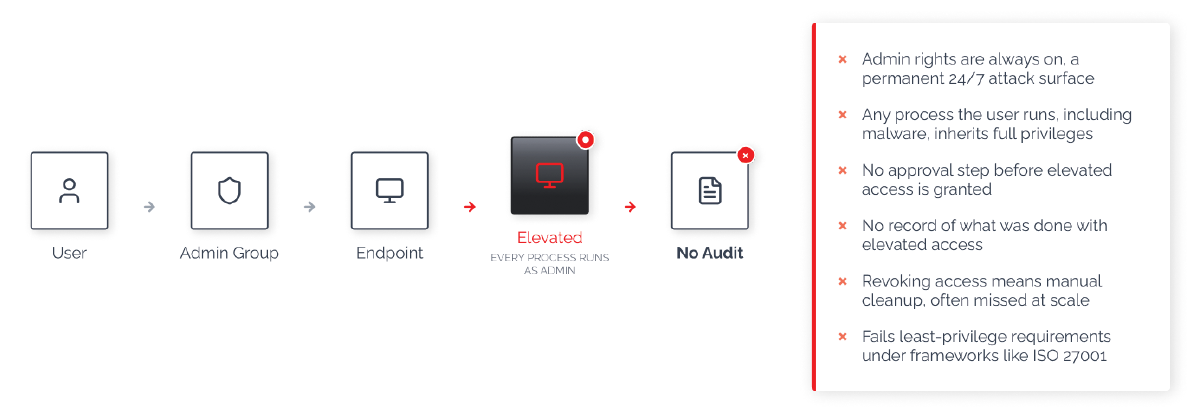
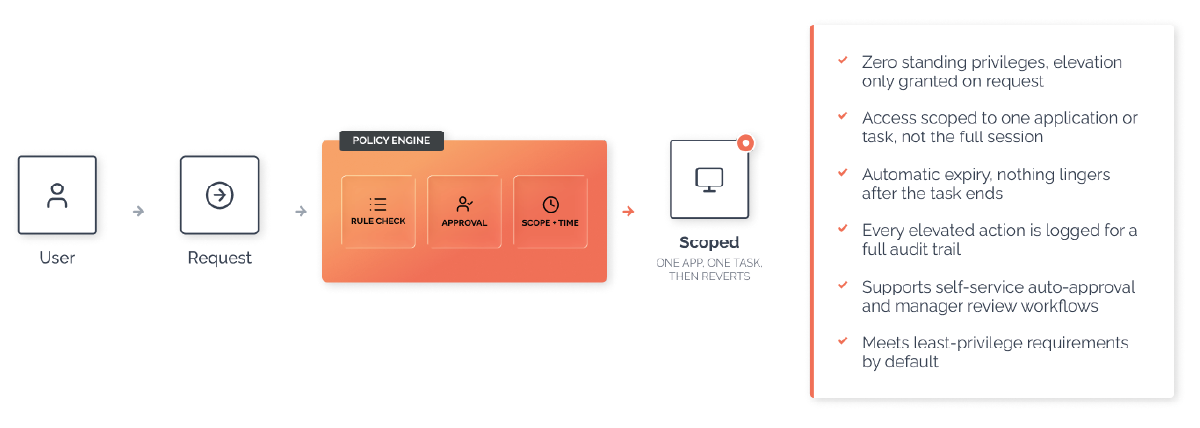
Standing Privileges vs Just-in-Time Elevation
Traditional Privilege Flow
Just-in-time ELevation Flow
All Features, All Products, Lifetime Free
Your free plan includes 25 licenses for our Endpoint Privileged Management, Secure Remote Access, and Web Access Management products. No credit card needed, guaranteed lifetime free access.
Try the Free PlanFAQs
General
Endpoint Privilege Management removes standing local administrator rights from everyday users while letting them request elevation for specific tasks, applications, or a timed session. Requests are routed through automated, fully audited workflows, so IT teams keep control without becoming a bottleneck for routine software installs and updates.
Elevation requests that would otherwise go through a helpdesk ticket are handled through self-service requests, pre-approval rules, and auto-approval features (Machine Learning and AI Approval). Admins configure the rules once; routine requests are then approved automatically or resolved by the end user, and only genuinely new or risky requests need manual review.
Endpoint Privilege Management is available for Windows, macOS, and Linux endpoints, and for Windows Server. Core functionality (elevation requests, approval workflows, audit logging) is consistent across platforms; some features are platform-specific, which is noted throughout this FAQ.
Elevation Methods
A standard user right-clicks a program and selects “Run as Administrator.” Admin By Request intercepts the request and, depending on configuration, asks for a reason, an email, or a phone number before submitting it for approval. Elevated privileges apply only to that specific application or installer, and only for the duration of the install or task.
A user requests full administrator access from the tray menu, provides a reason if required, and is granted local administrator rights for a set duration once approved (15 minutes by default on workstations, 30 minutes on servers). A countdown timer shows the remaining time, and the user can end the session early. Users cannot uninstall Admin By Request or add, remove, or modify user accounts during a session.
No. Approval can be required, granted automatically, or skipped entirely, depending on how “Require approval” is configured. Where approval is required, pre-approval rules, Machine Learning auto-approval, and AI Approval can all reduce or eliminate manual review for trusted software, while unfamiliar or unrecognized requests still go to an admin.
Approvals and Pre-Approval Rules
Yes. Pre-approved applications, folders, and vendor certificates let you define trusted software once. Matching requests are approved automatically, whether matched by the individual application, a folder of executables, a certificate, or a wildcard pattern such as ` .msi`.
Yes, through Sub-Settings. Sub-Settings override the global configuration for specific user groups, computer groups, or organizational units, so IT staff, for example, can have broader elevation rights than the rest of the organization. Sub-Settings work with Entra ID/Azure AD, Active Directory, Google Identity, JumpCloud, and Okta groups.
Admins see the request in the portal (and can be notified by email or a real-time push notification through the mobile app), along with the user’s justification and contact details if collected. Approving or denying takes one click; the requesting user is notified either way.
Auto-Approval: Machine Learning and AI Approval
Machine Learning auto-approval watches which applications administrators manually approve over time. Once an application reaches an administrator-configured approval threshold, it moves onto an auto-approval list and is elevated automatically from then on, without further manual review. It requires “Require Approval” to be enabled and is available on Windows and macOS.
AI Approval scores applications using a global reputation database built from elevation activity across Admin By Request’s full customer base, covering more than 12 million applications. Where Machine Learning auto-approval learns an organization’s own approval history over time, AI Approval can recognize widely used, reputable software from day one, even on a brand-new deployment with no approval history yet. Both can run together: AI Approval handles broadly reputable software immediately, while Machine Learning auto-approval learns the applications specific to your organization.
No. Every elevation request, whether manually approved, pre-approved, or auto-approved, is still checked against malware detection. A file that scans as malicious is blocked regardless of any approval rule that would otherwise apply.
Malware Detection
Yes. Every Run As Admin and Admin Session request is checked using OPSWAT MetaDefender, which runs the file against more than 30 independent scanning engines. The file’s SHA-256 checksum is checked against the database in under a tenth of a second; files not already in the database can be uploaded for full multi-engine analysis.
If any major engine, or more than one engine overall, flags the file, execution is blocked on the endpoint before it runs. The event is recorded in both the Auditlog and the Events log so administrators have a full record of what was blocked and when.
Users see a brief scanning notice, but the check itself typically completes in a fraction of a second. This is what makes it practical to run auto-approval features without giving up malware protection: known-safe software can still clear instantly, while the scan runs underneath as a safeguard.
Local Admin Rights and Device Ownership
Yes. Clean-up Local Admins lets administrators identify and revoke unwanted local administrator accounts across endpoints from the portal, rather than doing it machine by machine. Revoked accounts move to a two-week restore window in case rights need to be reinstated, and built-in protections prevent removing critical accounts such as domain administrators or the built-in Windows Administrator account.
Yes. The CleanAdminsGroup setting removes users from the local Administrators group at every login unless their account is domain-based, so rights don’t silently persist between sessions.
Emergency Access
Break Glass Account provides a one-time-use local administrator account generated on demand from the portal. Credentials are random, shown once, and never stored in Active Directory. The account is scoped to a single machine and is destroyed automatically when the user logs out or when the configured expiry time is reached, whichever comes first.
Break Glass requires no schema changes and no Group Policy configuration, and it works on Azure AD-joined, Entra ID-joined, or standalone machines. All activity carried out during a Break Glass session is logged to the Auditlog, giving you a record of what was done with the account, not just that it existed.
MFA, SSO, and Identity
Yes. Endpoint MFA/SSO routes elevation requests through your identity provider (Okta, Office 365, Azure Active Directory, ADFS, or other SAML-based providers). Once the user authenticates and satisfies your organization’s policies, elevation is granted automatically, without a separate manual approval step.
When enabled, Email Match requires that the identity used to authenticate through SSO matches the user actually logged in on the endpoint, which prevents one person’s credentials from being used to elevate a different person’s session.
Yes. A global identity provider can be set for the organization, with Sub-Settings available to override it for specific user groups or regions.
Audit Logging and Reporting
Every elevation request, approval, denial, and administrator action is recorded in the Auditlog, including the reason supplied, software installed or uninstalled, and any UAC-elevated applications during a session. Malware detections and Break Glass activity are logged the same way.
Yes. Obfuscation settings let you anonymize users by assigning each one an alias: you can still track activity and patterns, but you cannot decode who a specific alias belongs to. Collection of usernames, emails, phone numbers, IP-based location, and hardware/software inventory can each be toggled independently.
Yes. The free Admin By Request mobile app (iOS and Android) mirrors key portal functions: viewing the Auditlog, and approving or denying pending requests with real-time push notifications. iPhone users can approve or deny directly from a notification, and paired Apple Watches are also supported.