

Secure Remote Access
Support your workforce from anywhere. Eliminate VPNs, jump servers, and infrastructure complexity while strengthening security.



































If Your Team Needs Help, Distance Shouldn’t Matter
The power of truly flexible remote support.
Your CFO is overseas and their laptop starts acting up. A field service technician is out on job sites all day and can’t stop for support. Retail POS workstations need regular updates, patches, and maintenance, but every minute of downtime means lost sales.
With Unattended Access you can:
Secure Remote Access changes everything.
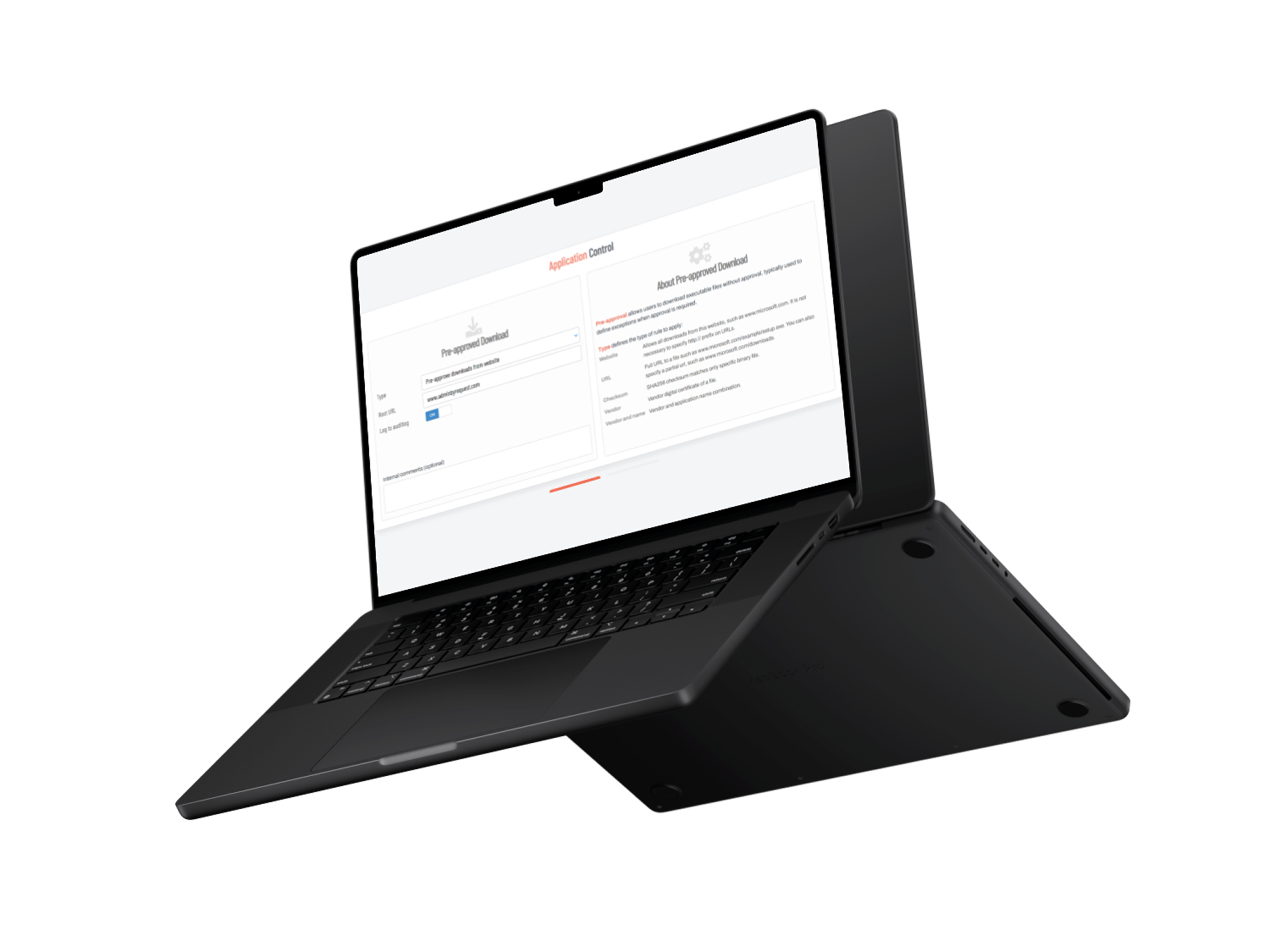
Three Core Remote Access Features

Remote Support
Screen sharing and remote control for IT support. Users can request help instantly, and IT can assist without complex setup.
Unattended Access
Connect to servers and workstations without anyone present. Perfect for maintenance, monitoring, and after-hours administration.
Vendor Access
Give external partners secure access to specific systems without VPN complexity or permanent credentials.
Ready to elevate your remote work security?
Request a demo today.
The Future of remote work
Watch It in Action
The Complete Security Suite
Endpoint Privilege Management, Web Access Management, and Secure Remote Access all come with these core Workstation Features. They work great on their own, but when combined you get a powerful zero-trust security platform to control who can do what, when they can do it, and how they access your systems.
Auditlog
Track all privileged activity on servers
Inventory
Gather all details about devices in your network
Sub Settings
Create granular access controls
Auto-Approval
Allow auto-approval of requests for elevation
Endpoint MFA/SSO
Enforce business rules with MFA and SSO
Integrations
Teams, Slack, Splunk, Sentinel, Intune, and more
Managed Cloud Service
A fully managed setup with seamless operation via Admin By Request. Prerequisites: Requires only an outbound connection to establish a secure tunnel and installation of the Admin By Request Server agent.
On-Premises Implementation
On-premises deployment using Docker within your infrastructure. Prerequisites: Involves running Docker containers and allowing outbound connections to Cloudflare for tunnel establishment.
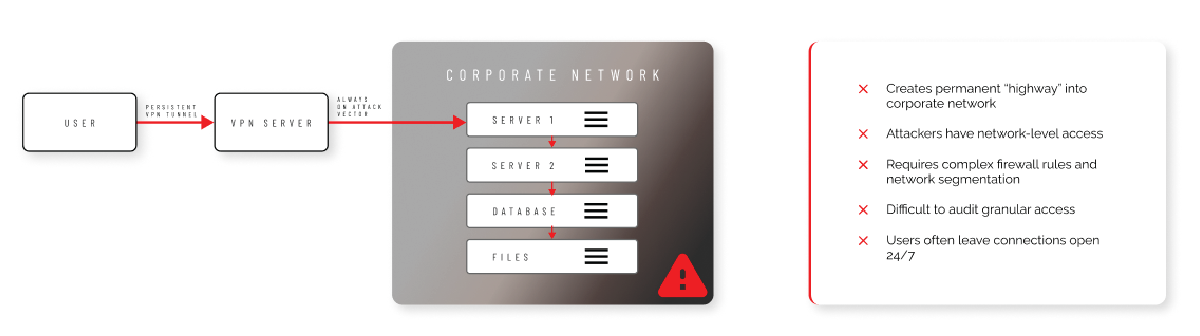
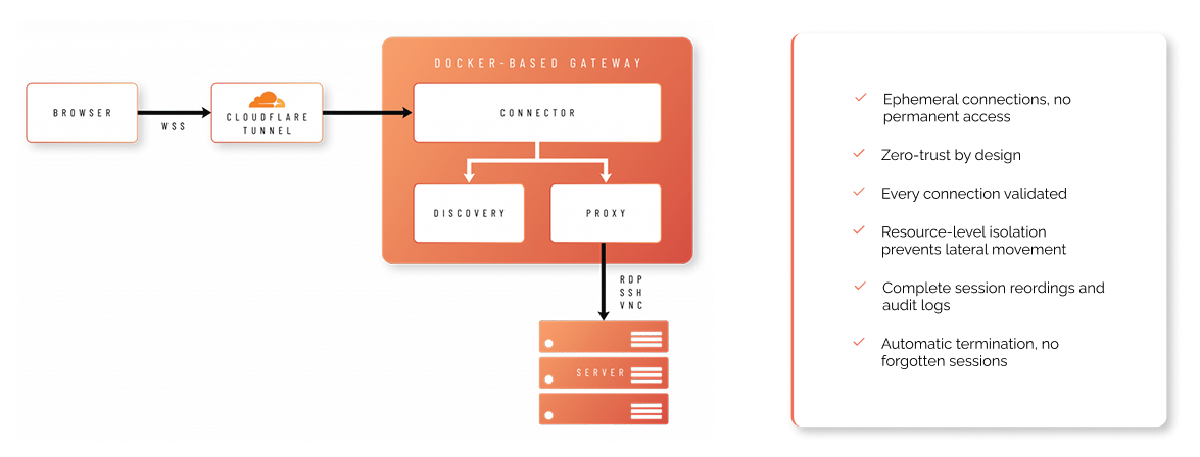
VPN vs Cloudflare Tunneling
VPN vulnerabilities
cloud tunneling strengths
All Features, All Products, Lifetime Free
Your free plan includes 25 licenses for our Endpoint Privileged Management, Secure Remote Access, and Web Access Management products. No credit card needed, guaranteed lifetime free access.
Try the Free PlanFAQs
General
Secure Remote Access is Admin By Request’s browser-based remote connectivity product. It covers three scenarios: connecting to unattended servers and workstations (Unattended Access), giving external vendors scoped access to internal devices without a VPN (Vendor Access), and helping end users with live, on-screen support sessions (Remote Support). All three are managed from the same portal and share the same underlying gateway architecture.
No. Connections happen through the browser using the Admin By Request Portal or, for vendors, the dedicated access.work portal. No VPN client or separate remote-access software is required on the connecting side. The endpoint being connected to does need the Admin By Request client installed.
Endpoints initiate an outbound connection to Admin By Request’s infrastructure using a Cloudflare Tunnel, over UDP port 7844 with the QUIC protocol. Because the connection is outbound from the endpoint rather than an inbound VPN tunnel into the network, there’s no VPN client to configure and no inbound firewall rule to open.
Windows (client 8.4.0 and later) and macOS (client 5.2/5.3 and later) are supported today. Linux support is expected later in 2026. On macOS, unattended sessions use a just-in-time VNC path rather than RDP.
They’re separate products that share a portal and can be used together. One example is Support Assist: Remote Support (Secure Remote Access) establishes the connection to a user’s device, and Support Assist (Endpoint Privilege Management) then lets the connected technician carry out elevated tasks under their own credentials, without the end user needing local administrator rights.
Unattended Access
Unattended Access lets IT administrators and vendors connect to servers and workstations when nobody is present at the device, using RDP, SSH, or VNC from the browser.
No, if passwordless access is enabled. Admin By Request creates rotating local shadow accounts (256-character passwords) that exchange credentials with the target server automatically, typically hourly, and stay invisible to the portal user. This is available on Windows and macOS agent-based endpoints.
Yes. The “Allow Unattended Access” setting can require IT approval before a session starts, and can mandate a written reason (a minimum of two words) that’s stored in the audit log.
Discovery scans the network at an interval you configure, from every 5 minutes to weekly, and lists devices it finds. Automatic enrollment can activate discovered devices immediately, or you can require manual enablement per device. Only active devices consume a license and can be connected to.
Discovery scans the network at an interval you configure, from every 5 minutes to weekly, and lists devices it finds. Automatic enrollment can activate discovered devices immediately, or you can require manual enablement per device. Only active devices consume a license and can be connected to.
Yes. IP whitelisting limits which network locations can initiate a connection, and Sub-Settings can apply different network scopes to specific users, computer groups, organizational units, or gateways.
Vendor Access
Vendor Access gives external vendors and third parties secure, browser-based access to specific internal devices, without VPN, and without installing any software on the vendor’s side.
Vendors authenticate and connect at access.work, a portal separate from the main Admin By Request Portal. Single sign-on must be enabled for each vendor user before they can log in there.
Yes. Scopes, configured under Logins > User Logins, define which computers a vendor can access. If no scope is set for a user, they can see every computer controlled by the gateway, so scoping down access for external vendors is worth setting deliberately rather than leaving open.
Not necessarily. Access can be set up in one of three ways: credentials required, approval required before connecting, or pre-approved access with no approval step. Which applies is visible in the portal by icon, a key for credential-based access, a lock for approval-required, and an unlocked icon for pre-approved.
Yes. All activity is tracked in the audit log, and if session recording is enabled, administrators can play back a video of everything the vendor did during the session.
The same three as Unattended Access: RDP, SSH, and VNC.
Remote Support
Remote Support is for live, screen-sharing help sessions, either an admin helping an end user or an end user requesting help, rather than unattended server access.
Either party can. In an admin-initiated session, an administrator opens the endpoint in the portal and clicks the Support link, which then requires the end user to approve the connection. In a user-initiated session, the user requests help from their client, and the administrator approves or denies it from the portal.
Yes. View-only mode, sometimes called Assist Only, restricts the supporting user to watching the endpoint without being able to interact with the keyboard or mouse, which is useful for sensitive systems such as executive workstations. When it’s off, the supporting user has full control.
No. Remote Support sessions are just-in-time: a temporary VNC server is created on the endpoint for the session and torn down afterward, so there’s no standing access left open for anyone to reuse.
Yes. Session expiry is configurable from 15 minutes up to unlimited, with a four-hour default, and can be set to a custom number of hours and minutes.
Yes, though it’s disabled by default. When enabled, sessions are recorded locally and the recording can be accessed by expanding the relevant entry in the audit log.
Security and Authentication
Yes, across all three products. When MFA is enabled, portal users must re-authenticate through single sign-on before a remote session can start; without valid SSO credentials, the connection is denied.
Yes. Secure Remote Access uses the same OPSWAT MetaDefender integration as the rest of the Admin By Request platform to detect malware, so this protection extends across products rather than being reimplemented separately.
Yes. A file-sharing toggle controls whether files can be uploaded during a session, so you can turn this off where it isn’t needed.
Yes. Sub-Settings override the global configuration for specific user groups, computer groups, organizational units, or gateways, the same model used across Admin By Request’s other products.
Gateways and Deployment
A gateway is the infrastructure that routes remote connections between the browser and the target device. Admin By Request hosts a cloud gateway by default, so most customers don’t need to run anything themselves. Organizations that want to keep traffic inside their own network can instead deploy an on-premise gateway.
It’s made up of three Docker-based components: a Connector, which validates and translates data; a Proxy, which establishes the actual RDP, SSH, or VNC connection; and a Discovery service, which finds connectable devices on the network. Gateways can be deployed on Docker, Kubernetes, or custom infrastructure, and private keys are distributed via clipboard rather than downloaded to disk.
Yes. Multiple gateways can be deployed for different networks, with user and group restrictions applied per gateway or per network scope.
Audit Logging and Notifications
Connections, approvals, denials, and (when enabled) session recordings are all captured in the audit log across Unattended Access, Vendor Access, and Remote Support, giving a single place to review remote activity regardless of which of the three was used.
Yes. Email notifications can be sent for pending approval requests, detected malware, and unattended access requests. Templates support dynamic tags for details such as user name, computer name, and a link to the relevant audit log entry, and can be customized per organization.
Yes. Notification emails can be routed to a ticketing system, with dynamic tags included so tickets are created and updated automatically as requests are actioned.
Integrations
Yes, Admin By Request provides a ServiceNow integration alongside its core notification and ticketing options, for organizations that manage IT requests through ServiceNow.