

Web Access Management
Secure executable downloads and internet access, enforce browser policies, and protect yourself from ransomware and threats before they’re ever allowed to run






































Malicious Attacks Start At the Endpoint

Why Scan For Threats When You Can Stop Them Ever Happening?
Traditional anti-virus software scans for threats after they’ve already entered your system. PAM software protects at the system or server level, but what’s protecting your endpoints?
Admin By Request’s Web Access Management takes a proactive approach to endpoint security by controlling what users can access, download, and execute before malware can run. Rather than relying on detection after the fact, it lets IT teams enforce policies around web access, file downloads, and application installations, closing the door on the three most common attack vectors.
When combined with Endpoint Privilege Management, you create a layered defense that controls both what enters your endpoints and what can execute once it’s there.
Browsing and Downloads Are Your Biggest Blind Spot
One download can start a ransomware attack, but most endpoint tools leave this privilege surface wide open. So we built a tool that stops risks at the source.
Browsing Control
Allow open browsing or restrict to approved sites only. Block specific domains with custom messages.
- Safely allow browsing while blocking downloads from the same site
- Block by domain or domain + path with user-facing messages
- Pre-approved site rules eliminate noise for routine business access
Download Approval
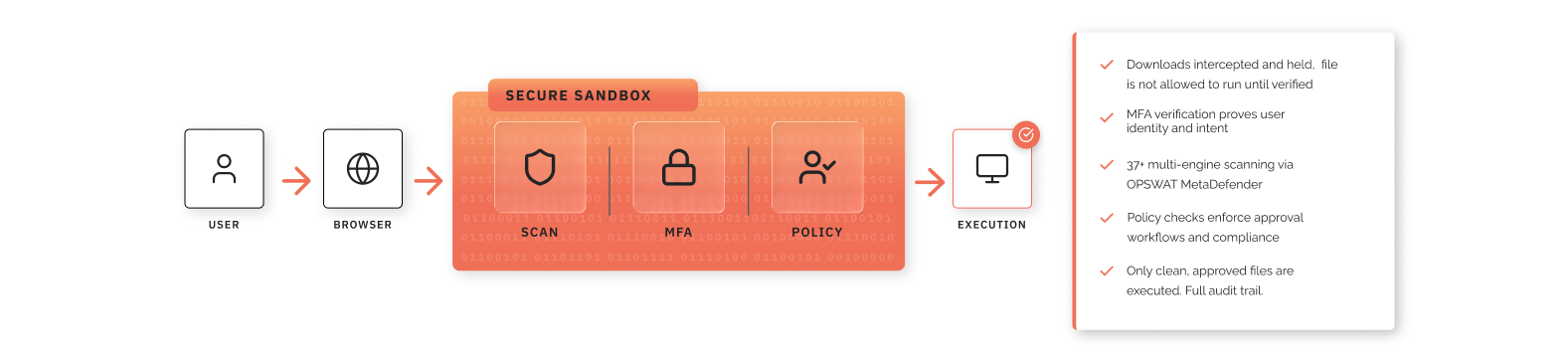
Require approval, justification, or MFA verification before executables are released. Enforce device owner restrictions and Intune compliance checks on shared or managed endpoints.
- MFA re-authentication via Entra ID before download release
- Optional identity matching to device owner
- Intune compliance enforcement blocks non-compliant devices
- Owner-only downloads for shared device environments
Trust-Based Policies
Define trusted software and known-bad sources by website, URL, SHA256 hash, vendor certificate, or vendor + app name. Reduce approval volume while maintaining tight control.
- Five matching criteria: website, URL, hash, vendor cert, vendor + app
- Custom blocking messages for denied downloads
- Per-rule audit logging for compliance visibility
Browser Enforcement
Specify permitted browsers and enforce minimum version requirements. Block outdated clients and embedded in-app browsers to reduce attack surface.
- Per-browser enable/disable and version enforcement
- Separate control for embedded/in-app browser engines
- Blocked browsers display clear user messaging
Threat Scanning
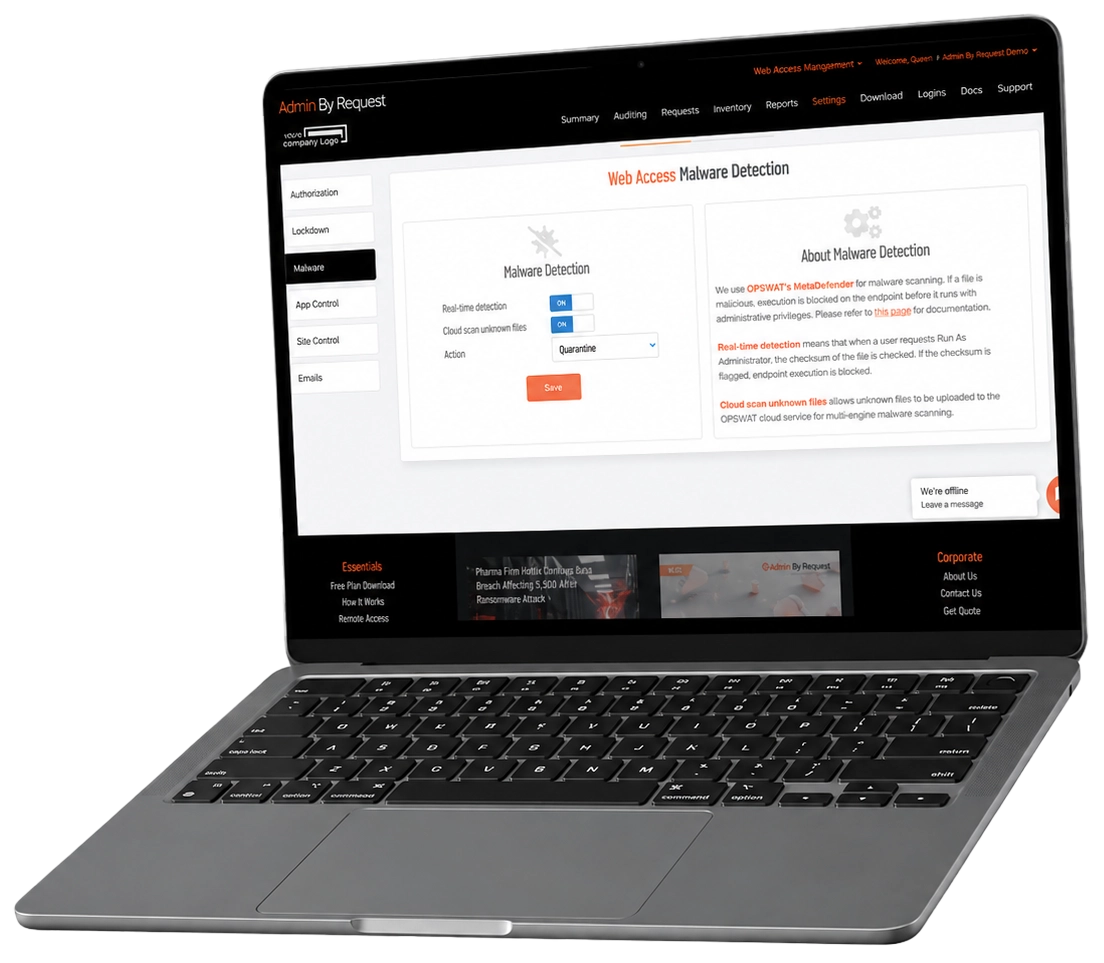
Scan executables with 37+ AV engines via OPSWAT MetaDefender. Quarantine threats automatically. Send unknown files to cloud analysis for deeper inspection.
- Real-time scanning on execution request
- Downloads are quarantined until scanned, before the user can access them
- Configurable response actions (quarantine, etc.)
Secure Downloads Before They Happen, Automate Browser Control
Web Access Management Resources
Traditional vs Quarantined Downloads
Traditional Download Flow

Quarantined Download Flow

Awarded two ‘Best of’ badges in Privileged Access Management
Admin By Request is officially recognized by Gartner Digital Markets Capterra independent review platform as ‘Best of’ in Value and Ease of Use for 2025.
All Features, All Products, Lifetime Free
Your free plan includes 25 licenses for our Endpoint Privileged Management, Secure Remote Access, and Web Access Management products. No credit card needed, guaranteed lifetime free access.
Try the Free PlanFAQs
General
Web Access Management is Admin By Request’s solution for controlling internet browsing and file downloads across your organization’s endpoints. It lets you define what users can access and download, enforce policies consistently on the endpoint, scan for malware, and maintain a full audit trail, all managed from the ABR portal.
Web Access Management extends ABR’s Endpoint Privilege Management approach into browser and download security. Where EPM controls local privilege elevation, Web Access Management applies the same control philosophy to internet access, giving you consistent governance across both vectors from a single platform.
Portal administrators configure Web Access Management. End users interact with it through download prompts and access controls enforced directly on their endpoints.
Download Controls
Yes. Download permission controls let you block executable downloads globally, require approval before a download proceeds, or allow downloads freely. Applied consistently on the endpoint, so policy is enforced regardless of portal connectivity.
Yes. Pre-approved downloads let you create exceptions for known-safe software by website root URL, direct download URL, SHA256 file checksum, vendor certificate, or a vendor and application name combination. Matched downloads bypass approval workflows automatically, while other controls (such as MFA requirements, Intune compliance checks, and malware scanning) still apply.
Yes. Blocked downloads let you create hard-deny rules using the same criteria as pre-approvals, by website, URL, file checksum, or vendor certificate. Blocked download rules take priority over other allow rules. You can also configure a custom message shown to the user when a block occurs.
Browsing Controls
Browsing permission controls apply your centrally managed site policies directly on the endpoint. This means access rules are enforced consistently. They don’t depend on portal connectivity to take effect.
Use Pre-approved Sites to define trusted websites that users can access without friction. Rules are based on root URL and can include subpaths. Pre-approved sites bypass browsing restrictions for matched destinations, while explicitly blocked sites still take priority.
Blocked Sites enforcement lets you define root URL and path-based deny rules that are applied directly on the endpoint. You can configure a custom message for users when a block is triggered, and each rule can be individually logged to the audit trail.
Security Lockdown
Yes. Browser Lockdown lets you define which browsers are permitted (Chrome, Edge, Firefox, Internet Explorer, and in-app browsers) and set a minimum version for each. Browsers that don’t meet your requirements are blocked before they can be used.
Yes. MFA-protected downloads require users to complete SSO re-authentication (currently Microsoft 365/Entra ID) before a download is released. You can also enable email matching, which verifies that the authenticated identity matches the endpoint user.
Yes. Enabling owner-only download restriction means only the user assigned as the device owner in inventory can download executables. This is particularly useful on shared devices where non-owners should not be able to introduce software. Other users on that device can still browse, depending on your browsing permission settings.
Yes. Intune compliance gating blocks executable downloads on devices that aren’t Intune compliant, helping you align software access with device health and management posture. This requires the Entra ID Connector to be configured. Browsing access is not affected by this setting.
Malware Detection
Web Access Management uses OPSWAT MetaDefender for malware detection. When a download is requested, the file is placed in protected temporary storage on the endpoint, where the user can’t reach it, and its checksum is checked against known malware signatures before the file is released to the user. You can also enable cloud scanning, which uploads unknown files for multi-engine analysis to catch threats that aren’t yet in local signature databases.
You configure the action. At a minimum, quarantine is supported. Detected events are logged and visible in the portal for review.
Audit Logging
Web Access Management builds an audit trail around browsing activity, download decisions, approvals, bypasses, and blocks. Each event captures what happened and why, so administrators can review the record after the fact for security investigations or compliance reporting.
Yes. Pre-approved and blocked rules for both sites and downloads include a per-rule audit log toggle, so you can choose which exceptions and enforcements generate log entries.