

Skip to content
Admin by request zero trust platform logo, primary for dark backgrounds » admin by request
  • Platform

    Products

    Shield with user silhouette and a verification checkmark, indicating a verified secure profile account. » admin by request

    Endpoint Privilege Management

    Control local admin rights without slowing users.  Easy deployment, powerful protection.

    Security shield with globe and a checkmark, indicating secure online access » admin by request

    Web Access Management

    Prevent risky downloads and control browsing. Reduce internet access risks.

    Shield icon with a computer monitor and a checkmark badge, indicating verified security or protection. » admin by request

    Secure Remote Access

    Fast, secure, audited access for anyone who works on your systems remotely.

    Platform

    Trust Center

    Compliance docs: SLA, risk assessments, pen tests, and more.

    Free Plan

    Ideal for POC: 25 EPM seats and 25 remote access seats lifetime free.

    Integration Hub

    Integrations with SIEM tools, IDPs, ticketing systems, and more.

    Core Features

    • Single App Elevation
    • Endpoint MFA Elevation
    • Break Glass/ LAPS
    • AI Auto-Approval
    • Multi-Platform (Win, macOS, Linux)
    • ServiceNow App
    • Malware Detection
    • See All >>

    Free Plan – 25 EPM seats and 25 Secure Remote Access seats.

    Free Plan
    Book Demo
    Get a Quote
  • Enterprise

    Enterprise Hub

    Enterprise Home

    Home base for enterprise organizations needing scalable solutions to privileged access

    Enterprise Use Cases

    Audit and Compliance

    Achieve your compliance goals with a foundation of least-privilege principals

    Legacy PAM

    Extend your current capabilities with software that integrates easily into your existing stack

    Productivity

    Keep your team moving and reduce helpdesk tickets without sacrificing security

    Enterprise Resources

    Resource Hub

    Curated resources to help you protect your business from growing cybersecurity threats

    Trust and Cybersecurity

    Trends, tactics, and frameworks from the industry’s most cited annual research

    Get in touch for a free 30 minute demo and quote
    Free Plan
    Book Demo
    Get a Quote
  • Solutions

    9 Industries

    By Industry

    • Finance
    • Healthcare
    • Manufacturing
    • Education
    • Retail
    • Critical Infrastructure
    • Information Technology
    • MSP
    • See All >>

    17 Frameworks

    By Compliance

    • GDPR
    • Cyber Essentials Plus
    • HIPAA
    • NIST SP 800-53
    • SOC 2
    • DORA
    • ISO 27001
    • SOX
    • See All >>

    8 Scenarios

    By Use Case

    • Audit & Compliance
    • Zero Trust
    • Insider Threats
    • Remote Work
    • Helpdesk Overload
    • Emergency Access
    • DevOps
    • Productivity
    • See All >>

    Not sure which fits? Speak to our team and we’ll map a solution that’s right for you.

    Free Plan
    Book Demo
    Get a Quote
  • Resources

    Documentation

    Documentation Center

    Home base for all product technical docs

    Admin Web Portal

    Configure and manage your web portal settings

    EPM Docs

    Configuring our Endpoint Privilege Management product

    Web Access Docs

    Configuring our Web Access Management product

    Release Notes

    Windows

    v8.6 and previous releases

    macOS

    v5.1 and previous releases

    Linux

    v4.0 and previous releases

    Learn

    FAQ

    Find answers to common product and support questions

    PDF Guides

    IT Admin Guides, End User Guides, Technical Notes

    Security Blog

    Weekly posts on cyberattacks and product updates

    Videos

    Product overviews, demos, deep dives, webinars

    Legal & Trust

    Legal Hub

    Legal information, resources, and company policies

    Trust Center

    SLA, risk assessments, penetration tests and compliance documents

    Compliance Mapping

    See how our solutions map to key compliance frameworks

    Need something specific? Our docs site has downloadable pdfs.

    Free Plan
    Book Demo
    Get a Quote
  • Company

    About Us

    Company history, the brand, and open job positions

    Visual Identity

    Logos, our media kit, and essential brand resources and guidelines

    Contact

    Book a demo, request a feature or quote, or contact sales

    Events

    Join us at upcoming events and security conferences

    Resellers

    We have generous reseller options so you can share the vision worldwide

    Blogs

    Latest cybersecurity insights, product-related posts, and industry updates

    Global experts in the US, Oceania, Singapore, and EMEA, including dedicated coverage in the Nordics and DACH

    Free Plan
    Book Demo
    Get a Quote
  • Quote
  • Formula 1

    Formula 1 2025

    Original Nico and Sauber content, race recaps, and giveaways for the 2025 F1 season

    WEC 2025

    Official race recaps from Kevin Magnussen’s season in the World Endurance Championship

    Formula 1 2024

    Original Kevin Magnussen content, race recaps, and giveaways for the 2024 F21 season

    Driver Bios

    Everything you need to know about your favorite drivers, Nico Hulkenberg and Kevin Magnussen

    Formula 1 2023

    Read all about Kevin Magnussen’s 2023 F1 season with full race recaps

    F1 Press & Media

    Read all previous press releases relating to our F1 and WEC partnerships

    Follow our socials for more updates on F1 results, giveaways and collaborations

    Free Plan
    Book Demo
    Get a Quote
  • Platform
    • Endpoint Privilege Management
    • Secure Remote Access
    • Trust Center
    • Free Plan
    • Integration Hub
    • Single App Elevation
    • Endpoint MFA Elevation
    • Break Glass/ LAPS
    • AI Auto-Approval
    • Multi-Platform (Win, macOS, Linux)
    • ServiceNow App
    • Malware Detection
  • Solutions
    • Industries
    • Compliance
    • Use Cases
  • Resources
    • Documentation Center
    • Admin Web Portal
    • EPM Docs
    • Remote Access Docs
    • Release Notes
    • FAQ
    • PDF Guides
    • Security Blog
    • Videos
    • Legal Hub
    • Trust Center
    • Compliance Mapping
  • Company
    • About Us
    • Visual Identity
    • Contact
    • Events
    • Resellers
    • Blogs
  • Quote
  • Resell
  • Formula 1
  • Log In
Login
Free Plan
Duplicate » admin by request

UAC: The Feature You Love to Hate

  • Steve Dodson
  • November 26, 2020
Digital artwork of white dots and lines connected to each other over a blurry background of orange and white dots.

All Windows users are familiar with the User Account Control (UAC) prompt:
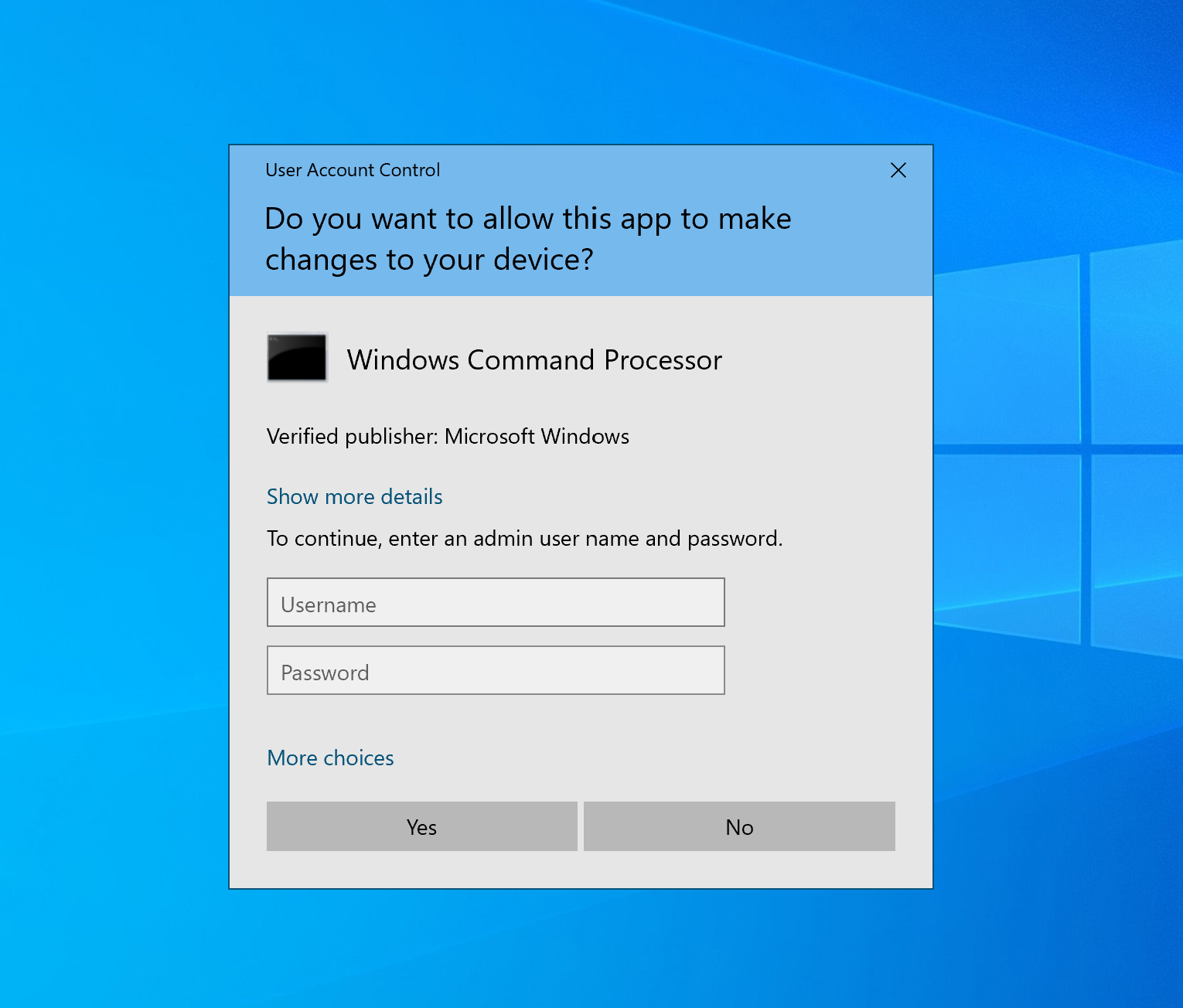
It’s been a bit of a love-hate relationship from the very start, when UAC made its first appearance with Windows Vista. This old Apple commercial illustrates the UAC experience fairly well (click photo to view video)…

And although the security software has improved in leaps and bounds since Vista, it’s still far from perfect – particularly for bigger enterprises with a large number of endpoints.

UAC and its quirks are a big reason why software like Admin By Request exists – we saw the need to be able to do a lot more that what UAC could deliver out of the box: compliance, management, logging, granularity and more, all rolled into a good user experience.

So let’s take a look into what UAC is and isn’t, and why it’s an important (albeit, clumsy) part of Windows security.

The Idea Behind It

UAC exists to prevent illegitimate changes to the computer system – changes that could be made by apps, users, or malware.

The security feature also aims to enable users to elevate in flow from a standard user account to an administrator account; to run common processes as a standard or administrative user without logging off, switching users, or using Run As.

How It Works:

With UAC, the system creates an access token for a user at log in, which contains specific data for authorisation purposes, such as the level of access that the user is granted.

This data is used by Windows to track what resources a user can and can’t access.

Standard User

Standard user access tokens have the least amount of privileges on the device possible.

On a standard user account, apps can only be launched with the standard user access token, and these apps are only able to operate within the bounds of the access rights granted to a standard user.

Administrative User

A full administrator access token, on the other hand, includes Windows privileges and SIDs.

A user account that belongs to the local administrator group has Windows privileges assigned to it. However, all apps launched by this user will run in the security context of a standard user by default; that is, unless an administrator specifically authorises the app to gain admin-level access to the system.

When an app does need to run with more than standard user rights, UAC will prompt the user to provide consent or input administrator credentials via the pop-up UI.

When consent is given or credentials submitted successfully, UAC allows the app to make use of a full administrative token, and the user to then have explicit control of apps that are making system level changes on their device.

Quirks and Questions

Firstly, there’s question of whether UAC offers too much flexibility.

Being user-driven, the low-compliance software can be circumvented by impatient users thanks to some much-too-lenient setting levels available for selection with the UAC settings page:
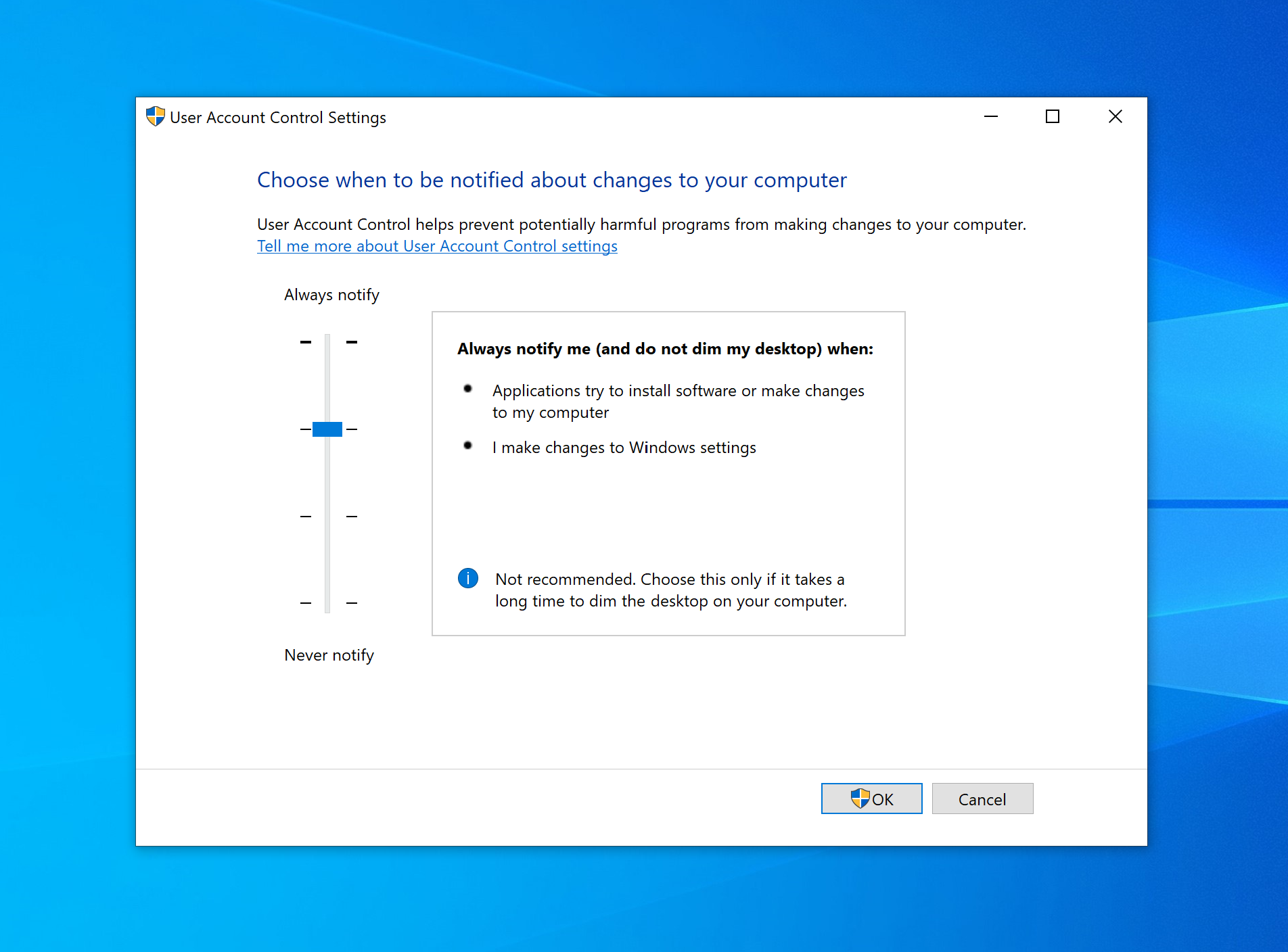
Of the four levels of UAC settings, the lower two allow for changes to be made to Windows settings without the consent or credentials pop-up being displayed – with the lowest also allowing for installations without approval.

Even if policies in the workplace require UAC settings to be set at the highest level (default), what’s to stop a user circumventing UAC controls on a home device that has access to company resources?

As the saying goes, “If you know what’s good for you”. The truth is, most users don’t. And with UAC, underqualified users can still end up making decisions that compromise the system and network.

But on the other side of the fence, sticking to the recommended default UAC settings leads instead to users pulling hair, gnashing teeth, and demanding blood (or at least, a little bit of independence).

Paul Boutin, Gadgetwise writer with the New York Times, described the UAC experience accurately: “Those (UAC) pop-ups are like having your Mother hover over your shoulder while you work.”

And user’s far and wide have resonated this cry, citing intrusive repetitiveness and disruption as the bane of their Window’s user experience.

Intrusive Repetitiveness

At the default setting level, UAC will more than likely be prompting both administrative and standard users to the point where it disrupts productivity.

In order to gain elevation when prompted with the credential UI, standard users would require their own separate admin credentials, someone else’s admin credentials, or for an IT tech to physically come and enter credentials on their machine.

In an enterprise with 25,000+ endpoints, you can imagine the chaos:

Unnecessary admin accounts littering the workplace.

The potential for administrative credentials to be stolen or compromised soaring every time an IT admin enters their details for a frustrated standard user trying to do a simple, everyday task.

Administrative users (who need frequent elevation) feeling justifiably frustrated at continuously having to enter their details throughout the day when they have already been approved within the workplace to make changes to the system.

And so on and so forth.

Window’s UAC dream of a ‘seamless approval flow’ experience, that a large organisation needs to function effectively, isn’t achieved.

But, despite complaints, disabling UAC would result in even worse situations than those described above.

So what does an organisation do when a necessary security tool doesn’t quite strike the right balance between security and flexibility?

Finding the Balance with Admin By Request

They find a user access security tool that delivers the whole package of tight security and good useability in one.

Admin By Request’s high-compliance, policy-driven Privileged Access Management (PAM) solution, suitable for enterprises with any number of endpoints, addresses the need for UAC – and refines the solution.

1. Elevating processes and not the end user.

The ‘seamless approval flow’ experience is achieved without compromising security, with Admin By Request allowing for on-demand elevation of applications – not users.

When the software grants administrator access, the app gains elevation while in use, but the user account never gets full administrator access to the system.

This method ensures the Principle of Least Privilege (POLP) and Just-in-Time elevation (JIT) – granting users the minimum privileges necessary, and only when necessary – are adhered to at all times.

2. A customised consent.exe

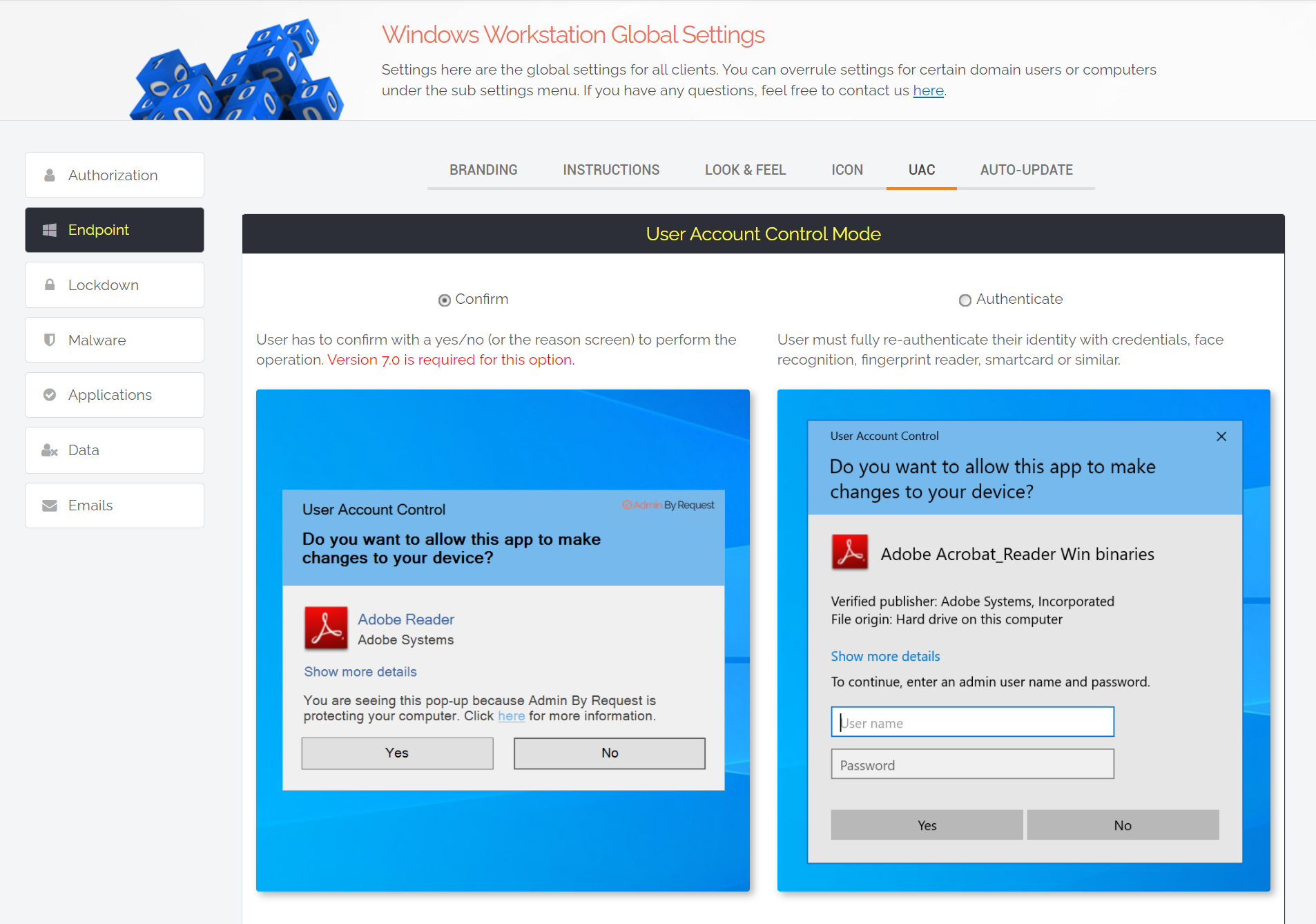
When a user requires elevation, a customised Admin By Request version of UAC’s Consent UI displays the PAM software’s default ‘Confirm’ pop-up to the user.

The software can also be configured to display a credentials pop-up.

The settings that determine which pop-up is displayed to different groups of users can be configured within the Admin By Request user portal, under global and sub-settings:
3. Whitelisting

Admin By Request allows for the whitelisting of applications known to be safe, so that users aren’t interrupted every time they need access to common processes.

When configuring whitelisting in the Admin By Request user portal, if you leave ‘User Confirmation’ toggled off, the app in question will start as admin:
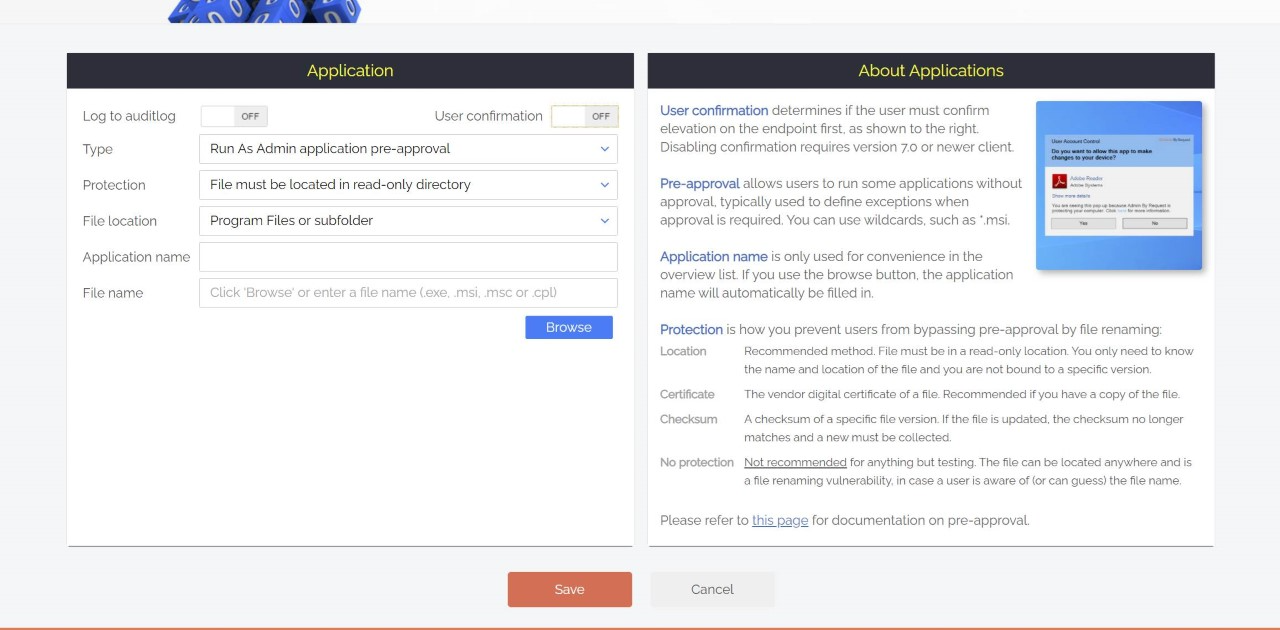
This highly productive feature allows for common, approved apps to simply start as admin, meaning your once frustrated developers don’t have to confirm every time they want to start Visual Studio.

Essentially the solution takes a user-driven, self-elevation approach – but only within the bounds of policies and security settings set out within the Admin By Request user portal.

None but your IT admins are able to make any changes to Admin By Request settings, and all elevated activity is monitored and logged within the Admin By Request Auditlog, giving compliance the tick.

The scale is never tipped in favour of flexibility over security or vice versa – as is often the case with our fair-weathered friend, UAC.

Summary

Microsoft’s UAC is a necessity and certainly carries some benefits in desktop management.

Admin By Request takes the best bits of UAC – and then adds more.

Download the latest version of Admin By Request today.

About the Author:

Picture of Steve Dodson

Steve Dodson

Steve provides research, analysis, insight and commentary on topical issues and events. He lives in New Zealand and has been working at FastTrack Software for 12 years as a cyber security analyst and technical writer.
» admin by request

Admin By Request Returns to it-sa 2026 with a Live Q&A Featuring Nico Hulkenberg

Admin By Request is back at it-sa 2026 in Nuremberg, October 27 to 29. Two days on the Forum A stage end with a live Q&A featuring F1 driver Nico Hulkenberg.

October 12, 2026 | By Pocholo Legaspi
Linux penguin logo beside the orange '4. 1' on a dark hexagon tech background with circuit accents (banner image) » admin by request

What’s New in Admin By Request for Linux 4.1

Admin By Request for Linux 4.1 is out, with policy-file scoping and a long list of customer-driven fixes. RHEL, Rocky Linux, and Ubuntu endpoints all benefit.

October 5, 2026 | By Pocholo Legaspi
Sleek all-in-one computer on a white desk with a keyboard and mouse, plus a pink cube-shaped device to the right. » admin by request

Installed vs. Running: What Software Inventory Leaves Out

Install-based inventory lists what registered during setup. Portable apps, scripts, and executables run from user folders never show up on that report.

September 18, 2026 | By Pocholo Legaspi
Black gt race car with red and white graphics and number 88 on a racing circuit, moving through a bend. » admin by request

Supporting Emerging Talent, Episode 3: Marcus Terkildsen at Spa-Francorchamps

Supporting Emerging Talent reaches Spa-Francorchamps with Marcus Terkildsen. The 16-year-old Dane answered a fog-hit, puncture-struck Sunday with a podium.

September 8, 2026 | By Pocholo Legaspi

Share this blog to your channels:

Get the Free Plan

All core features, unlimited term, no strings attached. Now with 30 days free support

Sign Up

Product

  • EPM

  • Remote Access

  • Web Access
  • Core Features

  • Productivity

  • Integrations

  • Download

Resources

  • Blog

  • Trust Center

  • Release Notes

  • Data Handling
  • Videos

  • FAQ

  • Documentation

Company

  • About Us

  • Formula 1
  • Events
  • Resellers
  • Global Offices

  • The Brand

  • Social Media

Support

  • Get a Quote

  • Book a Demo

  • Contact Sales

  • Licensing Info

  • Request a Feature
  • Submit Support Ticket

  • Email Us

Admin By Request
Linkedin Facebook X-twitter Reddit Instagram Youtube

© 2026 ADMIN BY REQUEST

Data Processing | Terms | Branding | Privacy Policy
Back to top

Book a Demo