
Skip to content
Admin by request zero trust platform logo, primary for dark backgrounds » admin by request
  • Platform

    Products

    Shield with user silhouette and a verification checkmark, indicating a verified secure profile account. » admin by request

    Endpoint Privilege Management

    Control local admin rights without slowing users.  Easy deployment, powerful protection.

    Security shield with globe and a checkmark, indicating secure online access » admin by request

    Web Access Management

    Prevent risky downloads and control browsing. Reduce internet access risks.

    Shield icon with a computer monitor and a checkmark badge, indicating verified security or protection. » admin by request

    Secure Remote Access

    Fast, secure, audited access for anyone who works on your systems remotely.

    Platform

    Trust Center

    Compliance docs: SLA, risk assessments, pen tests, and more.

    Free Plan

    Ideal for POC: 25 EPM seats and 25 remote access seats lifetime free.

    Integration Hub

    Integrations with SIEM tools, IDPs, ticketing systems, and more.

    Core Features

    • Single App Elevation
    • Endpoint MFA Elevation
    • Break Glass/ LAPS
    • AI Auto-Approval
    • Multi-Platform (Win, macOS, Linux)
    • ServiceNow App
    • Malware Detection
    • See All >>

    Free Plan – 25 EPM seats and 25 Secure Remote Access seats.

    Free Plan
    Book Demo
    Get a Quote
  • Enterprise

    Enterprise Hub

    Enterprise Home

    Home base for enterprise organizations needing scalable solutions to privileged access

    Enterprise Use Cases

    Audit and Compliance

    Achieve your compliance goals with a foundation of least-privilege principals

    Legacy PAM

    Extend your current capabilities with software that integrates easily into your existing stack

    Productivity

    Keep your team moving and reduce helpdesk tickets without sacrificing security

    Enterprise Resources

    Resource Hub

    Curated resources to help you protect your business from growing cybersecurity threats

    Trust and Cybersecurity

    Trends, tactics, and frameworks from the industry’s most cited annual research

    Get in touch for a free 30 minute demo and quote
    Free Plan
    Book Demo
    Get a Quote
  • Solutions

    9 Industries

    By Industry

    • Finance
    • Healthcare
    • Manufacturing
    • Education
    • Retail
    • Critical Infrastructure
    • Information Technology
    • MSP
    • See All >>

    17 Frameworks

    By Compliance

    • GDPR
    • Cyber Essentials Plus
    • HIPAA
    • NIST SP 800-53
    • SOC 2
    • DORA
    • ISO 27001
    • SOX
    • See All >>

    8 Scenarios

    By Use Case

    • Audit & Compliance
    • Zero Trust
    • Insider Threats
    • Remote Work
    • Helpdesk Overload
    • Emergency Access
    • DevOps
    • Productivity
    • See All >>

    Not sure which fits? Speak to our team and we’ll map a solution that’s right for you.

    Free Plan
    Book Demo
    Get a Quote
  • Resources

    Documentation

    Documentation Center

    Home base for all product technical docs

    Admin Web Portal

    Configure and manage your web portal settings

    EPM Docs

    Configuring our Endpoint Privilege Management product

    Web Access Docs

    Configuring our Web Access Management product

    Release Notes

    Windows

    v8.6 and previous releases

    macOS

    v5.1 and previous releases

    Linux

    v4.0 and previous releases

    Learn

    FAQ

    Find answers to common product and support questions

    PDF Guides

    IT Admin Guides, End User Guides, Technical Notes

    Security Blog

    Weekly posts on cyberattacks and product updates

    Videos

    Product overviews, demos, deep dives, webinars

    Legal & Trust

    Legal Hub

    Legal information, resources, and company policies

    Trust Center

    SLA, risk assessments, penetration tests and compliance documents

    Compliance Mapping

    See how our solutions map to key compliance frameworks

    Need something specific? Our docs site has downloadable pdfs.

    Free Plan
    Book Demo
    Get a Quote
  • Company

    About Us

    Company history, the brand, and open job positions

    Visual Identity

    Logos, our media kit, and essential brand resources and guidelines

    Contact

    Book a demo, request a feature or quote, or contact sales

    Events

    Join us at upcoming events and security conferences

    Resellers

    We have generous reseller options so you can share the vision worldwide

    Blogs

    Latest cybersecurity insights, product-related posts, and industry updates

    Global experts in the US, Oceania, Singapore, and EMEA, including dedicated coverage in the Nordics and DACH

    Free Plan
    Book Demo
    Get a Quote
  • Quote
  • Formula 1

    Formula 1 2025

    Original Nico and Sauber content, race recaps, and giveaways for the 2025 F1 season

    WEC 2025

    Official race recaps from Kevin Magnussen’s season in the World Endurance Championship

    Formula 1 2024

    Original Kevin Magnussen content, race recaps, and giveaways for the 2024 F21 season

    Driver Bios

    Everything you need to know about your favorite drivers, Nico Hulkenberg and Kevin Magnussen

    Formula 1 2023

    Read all about Kevin Magnussen’s 2023 F1 season with full race recaps

    F1 Press & Media

    Read all previous press releases relating to our F1 and WEC partnerships

    Follow our socials for more updates on F1 results, giveaways and collaborations

    Free Plan
    Book Demo
    Get a Quote
  • Platform
    • Endpoint Privilege Management
    • Secure Remote Access
    • Trust Center
    • Free Plan
    • Integration Hub
    • Single App Elevation
    • Endpoint MFA Elevation
    • Break Glass/ LAPS
    • AI Auto-Approval
    • Multi-Platform (Win, macOS, Linux)
    • ServiceNow App
    • Malware Detection
  • Solutions
    • Industries
    • Compliance
    • Use Cases
  • Resources
    • Documentation Center
    • Admin Web Portal
    • EPM Docs
    • Remote Access Docs
    • Release Notes
    • FAQ
    • PDF Guides
    • Security Blog
    • Videos
    • Legal Hub
    • Trust Center
    • Compliance Mapping
  • Company
    • About Us
    • Visual Identity
    • Contact
    • Events
    • Resellers
    • Blogs
  • Quote
  • Resell
  • Formula 1
  • Log In
Login
Free Plan
Duplicate » admin by request

New Feature Spotlight: Break Glass Account

  • S Dodson
  • January 1, 2022
Lines that start off orange then turn grey, making patterns over wavy digital artwork.

With the arrival of a game-changing new feature in Admin By Request version 7.3, you can eliminate the need to use Microsoft’s Local Administrator Password Solution: Break Glass Account – the more efficient, secure, and comprehensive version of Microsoft LAPS, rolled into your existing Privileged Access Management (PAM) software.

The LAPS Shortfall

The new feature is based on the idea behind Microsoft’s Local Administrator Password Solution (MS LAPS).

If you’re familiar with MS LAPS, you’ll know how it works and why it’s necessary:

  • Hackers love the tried and tested technique of exploiting administrator accounts, either via horizontal or vertical privilege escalation.
  • MS LAPS works to prevent this by utilizing Active Directory (AD) to manage admin account passwords across all endpoints, with a key component of management being the forced rotation of passwords for each admin account.
  • When access to an admin account is needed, system admins can retrieve stored passwords from AD and log in to the administrator account.

The reasoning is valid, but MS LAPS leaves several security (and usability) gaps that we thought needing filling.

Break Glass Account – What is It?

The new Break Glass feature takes the functionality of MS LAPS and turns it into a much more attractive option:

It creates a new, temporary, one-time-use Administrator account on an endpoint, that works on domains, Azure AD, and stand-alone, which Audits all elevated activity, and terminates within a pre-defined amount of time or on log out.

The Benefits

The Break Glass Account feature incorporates the best bits of LAPS – then adds several layers of security and improves the user experience.

Security

  • Break Glass completely circumvents the need to use the built-in Windows local Administrator account – you can disable it completely to add an extra later of security to your endpoints.
  • The account must be used within an hour of being generated, minimizing the potential attack window and risk of account compromise.
  • Risk is further minimized by a one-time-only log in functionality: the user can log in once, and after log out, the account is terminated.
  • The user has only the time specified under Expiry when the Break Glass account was generated to use the administrator account; this duration is indicated on the built-in desktop background of each account. When the time-period is up, the session is terminated.
  • Measures are in place to ensure the Expiry time cannot be tampered with: if the Account user attempts to extend their time limit by adjusting the clock, the Account automatically logs out / terminates.
  • All Usernames and Passwords are automatically generated, random, and complex, minimizing the possibility for a successful brute force attack.
  • Passwords are stored within the web application, only accessible by User Portal users / IT Admins via credentials – a safer option compared to MS LAPS’s storage of admin account passwords in plain text along with the AD computer record.

Ease of Use

With the addition of the Break Glass feature, you get a PAM solution that covers multiple bases:

  • Admin rights management
  • Logging capabilities
  • A full inventory
  • Anti-malware
  • Just-In-Time provisioning
  • LAPS

All combined into one security software package – eliminating the need to manage multiple security solutions on different platforms or through different applications.

Several cumbersome configuration steps required for MS LAPS setup are also eliminated with the Break Glass feature. You don’t have to deploy a Client-Side Extension (CSE) on every endpoint, extend the AD schema in order for your systems and network to accommodate the feature, configure password settings such as complexity, length, and expiry, or configure access permissions and Group Policy; we’ve already done the hard yards for you.

Possibly the best feature for ease-of-use is that the Break Glass Account does not require a domain; it works on domains, Azure AD, and stand-alone.

Real-Life Use Cases

1. Regaining Domain-Trust Relationship

As the name suggests, the Break Glass feature is ideal for ‘last resort’ situations, such as when the domain-trust relationship is broken and needs to be reconnected using an Administrator account.

2. Provisioning a Just-In-Time Administrator Account

The Break Glass Account doubles up as a Just-In-Time account that can be used for specific purposes / situations when necessary, e.g., provisioning an account for someone who doesn’t have credentials, but requires access to service an endpoint.

3. Extra Possibilities with Server Edition

Further to point 2, with Admin By Request Windows Server Edition you can provision an admin account to a consultant without giving them domain-wide permissions at any point in time.

How to Use Break Glass:

The way it works is simple, and we’ve broken it down into three stages:

Generate

1. Log in to your User Portal and navigate to the Inventory page. Select an endpoint that you want to enable the Break Glass Account on and locate the feature listed in the left-hand menu:

2. From the Expiry drop-down menu, select an amount of time that you want the Account to be available for. This time period can range from a minimum of 15 minutes, to an unlimited amount of time:
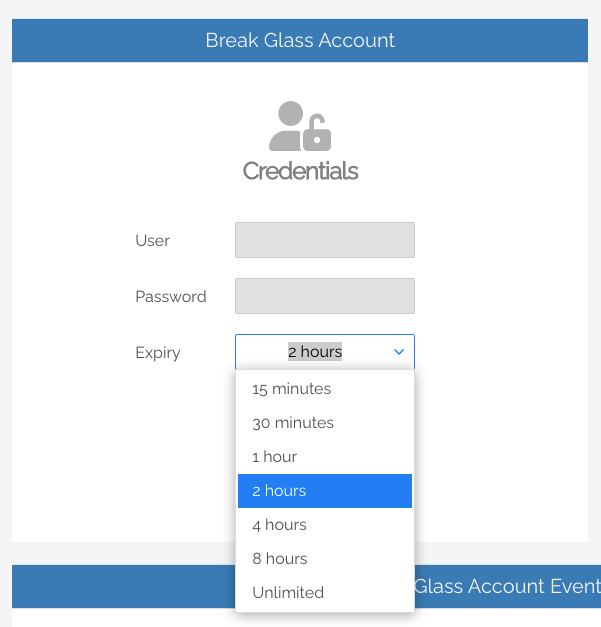
3. Click the Generate Account button, which issues a Break Glass Account and displays its Username and Password in the read-only textboxes:

4. Once generated, the status of the Break Glass Account is updated in real-time in your User Portal. The four possible states are:

  • Waiting for Endpoint – The Account is generated in the User Portal but not yet created on the endpoint (to create the account on the endpoint, see the next section, Activate Account).
  • Ready to Log On – The Account is created but has not yet been activated / used (i.e., logged in to).
  • Session in Progress – The Account is currently in use.
  • Account Removed – The Account has been terminated either due to the user logging out, or the pre-defined Expiry time being reached.

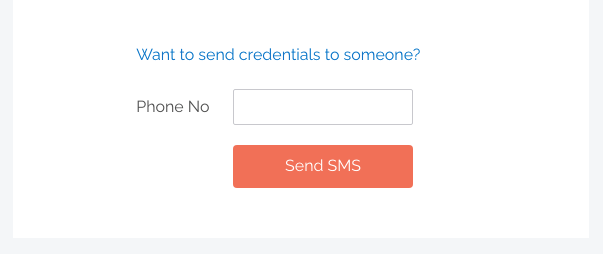
5. Optional: Send the new Break Glass Account credentials via SMS (i.e., text message) by entering the intended recipient’s mobile number into the textbox:
Activate

1. Log in / activate the Break Glass Account using one of the following methods:

  • Restart the device, then wait approximately 30 seconds for the account to be created. The User Portal will update the status message when the account is ready, and the Account will appear in the bottom-left of the Windows log on screen along with the other accounts available on that endpoint:
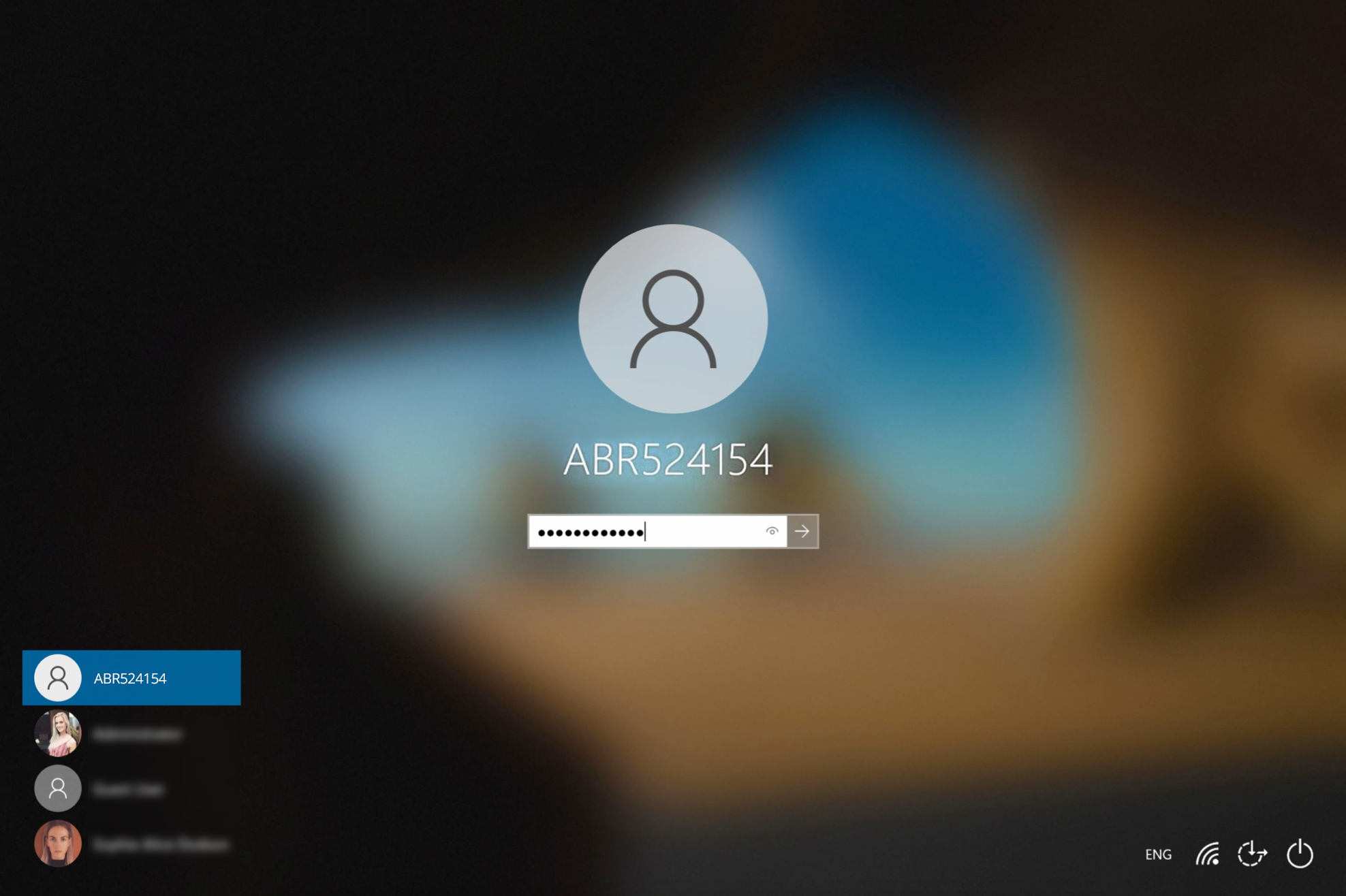
  • If enabled, you can select Other User in the Windows log in screen and type the generated Break Glass Account Username and Password into the fields. This may fail on the first attempt; if so, wait 10 seconds and then try again.
  • A third method to activate the account is by logging in to another account on the endpoint, selecting the Admin By Request icon from the bottom toolbar, and clicking the About item from the menu.

Terminate

1. Once logged in to the Break Glass account, the user has administrator privileges to do what they need to do, within the Expiry time displayed on the built-in screensaver:
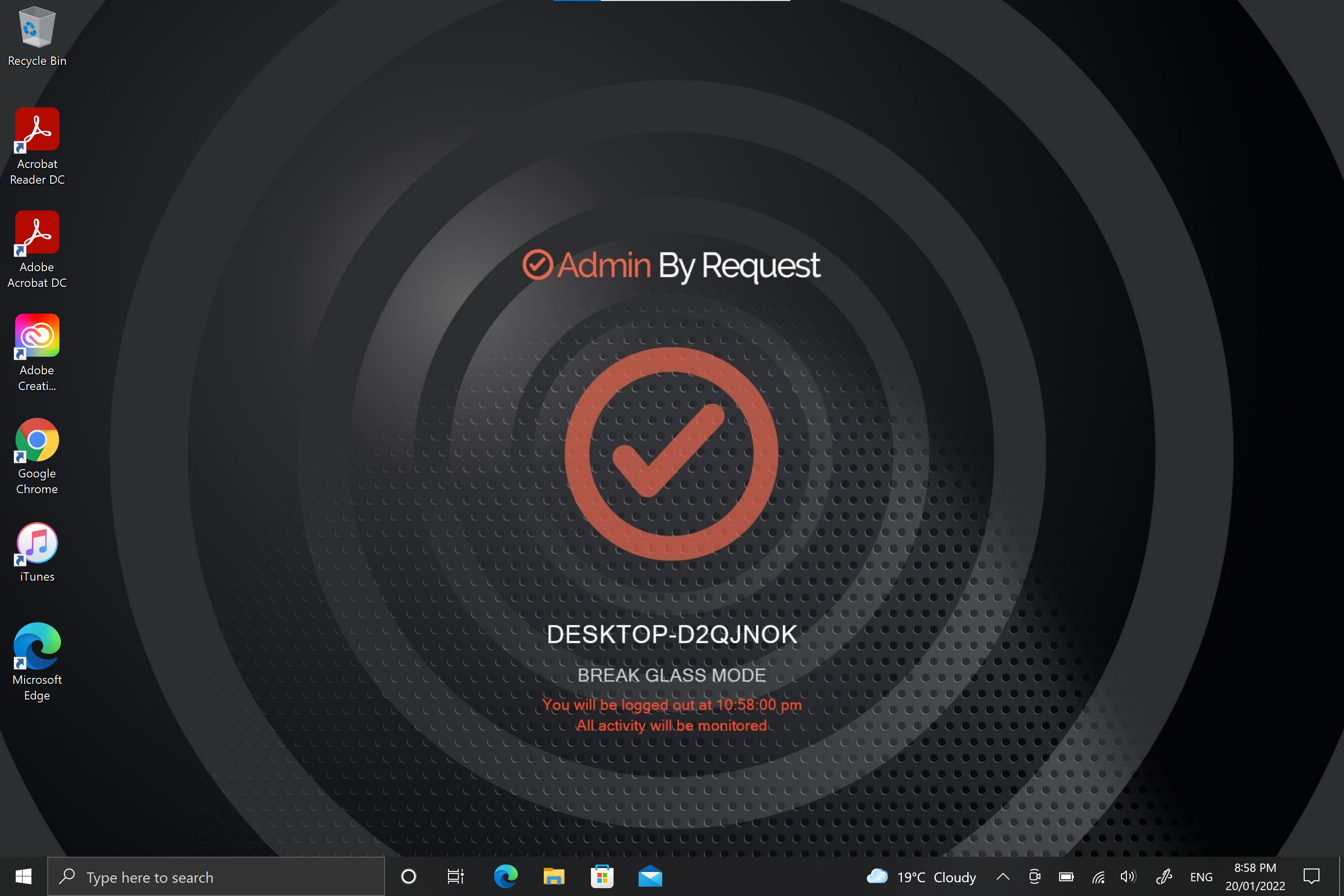
2. The account is for one-time-use only, so is terminated permanently when the user logs out, or when the Expiry time is reached – whichever comes sooner.

View Activity

1. Break Glass events such as account creation, activation, and termination are listed in the Events section of the feature page in your User Portal, color-coded, along with the time of the event and Username of the Account it belongs to:

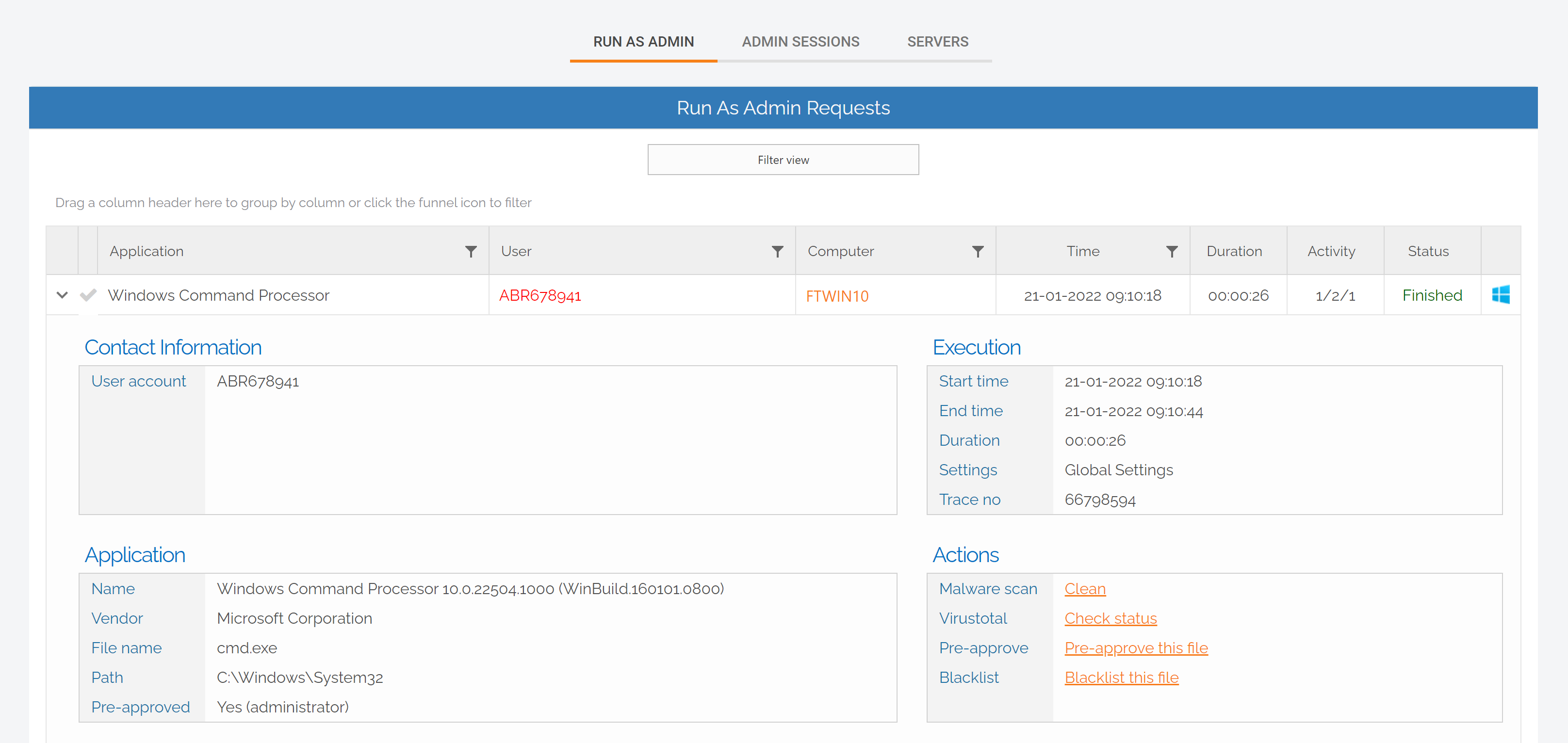
2. Privileged activity undertaken during the Break Glass session, such as Run as Admin, is logged in the Auditlog in your User Portal:
Ditch LAPS; Break Glass

LAPS functionality is a must for adequate security, but with the Break Glass Account you get comprehensive security, ease of use, and a range of features rolled into a single PAM solution.

Download Admin By Request version 7.3 for Windows today and leave LAPS and its shortfalls behind.

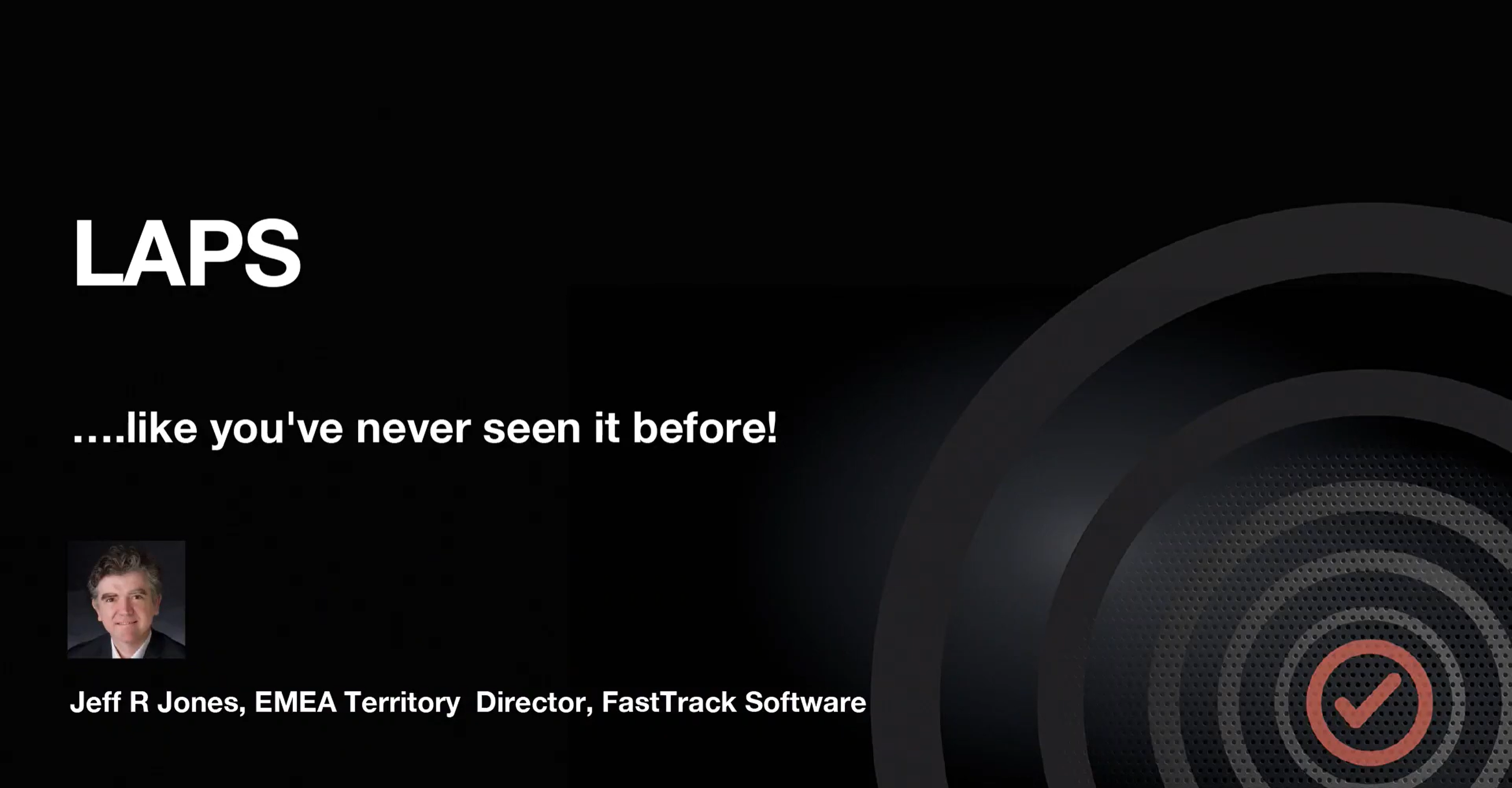
LAPS / Break Glass Recording

After release, we held a webinar covering all the good stuff:

  • How we got here – the need for this feature
  • Generating and using a Break Glass Account – how does it work?
  • Scenarios for use
  • What else is new with 7.3

If you missed out, we recorded the webinar and compiled it into a shortened version covering all of the highlights. Access the recording at the button below:

About the Author:

Picture of S Dodson

S Dodson

With a solid background in computer science and graphic design, my career kicked off writing tech manuals for various companies in both the software and hardware realms. I then side-stepped into marketing and found my passion in cybersecurity. I fuse my tech know-how with design skills to craft engaging blogs that spotlight cybersecurity for businesses. My main focus now is championing the marketing efforts of Admin By Request Zero Trust Platform, where my creative take on cybersecurity helps me create content that's enlightening, entertaining, and impactful. My articles have graced the pages of InfoSec Magazine and top-tier security websites like OPSWAT. I'm on a mission to stress the significance of cybersecurity and to showcase how Admin By Request is shaking things up by making enterprise solutions simple, intuitive, accessible, and affordable to organizations of all sizes, in any industry. My goal is to craft content that informs, intrigues, and motivates action, helping businesses understand the pivotal role of cybersecurity in the digital age we're now living in. Through my work, I aim to close the gap between technology and its real-world applications, keeping our audience well-informed, interested, and ready for the ever-evolving cybersecurity landscape. I bring a blend of extensive experience, deep expertise, recognized authority, and unwavering commitment to trustworthiness in cybersecurity. My goal? To make complex topics relatable and actionable for businesses of all sizes - just like Admin By Request strives to do.
Sourceforge leader fall 2026 badge centered on a dark hexagon background with orange accents. » admin by request

Admin By Request Named a Leader in Endpoint Privilege Management Software by SourceForge

Admin By Request EPM earns the SourceForge Fall 2026 Leader award. Our thanks go to every sysadmin and IT manager who took the time to share an honest review.

October 19, 2026 | By Pocholo Legaspi
» admin by request

Admin By Request Returns to it-sa 2026 with a Live Q&A Featuring Nico Hulkenberg

Admin By Request is back at it-sa 2026 in Nuremberg, October 27 to 29. Two days on the Forum A stage end with a live Q&A featuring F1 driver Nico Hulkenberg.

October 12, 2026 | By Pocholo Legaspi
Linux penguin logo beside the orange '4. 1' on a dark hexagon tech background with circuit accents (banner image) » admin by request

What’s New in Admin By Request for Linux 4.1

Admin By Request for Linux 4.1 is out, with policy-file scoping and a long list of customer-driven fixes. RHEL, Rocky Linux, and Ubuntu endpoints all benefit.

October 5, 2026 | By Pocholo Legaspi
Sleek all-in-one computer on a white desk with a keyboard and mouse, plus a pink cube-shaped device to the right. » admin by request

Installed vs. Running: What Software Inventory Leaves Out

Install-based inventory lists what registered during setup. Portable apps, scripts, and executables run from user folders never show up on that report.

September 18, 2026 | By Pocholo Legaspi

Share this blog to your channels:

Get the Free Plan

All core features, unlimited term, no strings attached. Now with 30 days free support

Sign Up

Product

  • EPM

  • Remote Access

  • Web Access
  • Core Features

  • Productivity

  • Integrations

  • Download

Resources

  • Blog

  • Trust Center

  • Release Notes

  • Data Handling
  • Videos

  • FAQ

  • Documentation

Company

  • About Us

  • Formula 1
  • Events
  • Resellers
  • Global Offices

  • The Brand

  • Social Media

Support

  • Get a Quote

  • Book a Demo

  • Contact Sales

  • Licensing Info

  • Request a Feature
  • Submit Support Ticket

  • Email Us

Admin By Request
Linkedin Facebook X-twitter Reddit Instagram Youtube

© 2026 ADMIN BY REQUEST

Data Processing | Terms | Branding | Privacy Policy
Back to top

Book a Demo